
Deposit – How to Deposit at Jiliwin Using the Maya Payment Method

Jiliwin is a modern online entertainment platform trusted by many users for its stable and secure operating system. The deposit process at Jiliwin is designed to be simple, easy to use, and fast, allowing players to access services and enjoy entertainment in just a short time.
The deposit system operates automatically with high transparency and security, minimizing risks during transactions. Players can confidently deposit funds and use their accounts conveniently.
How to Deposit at Jiliwin Using the Maya Payment Method
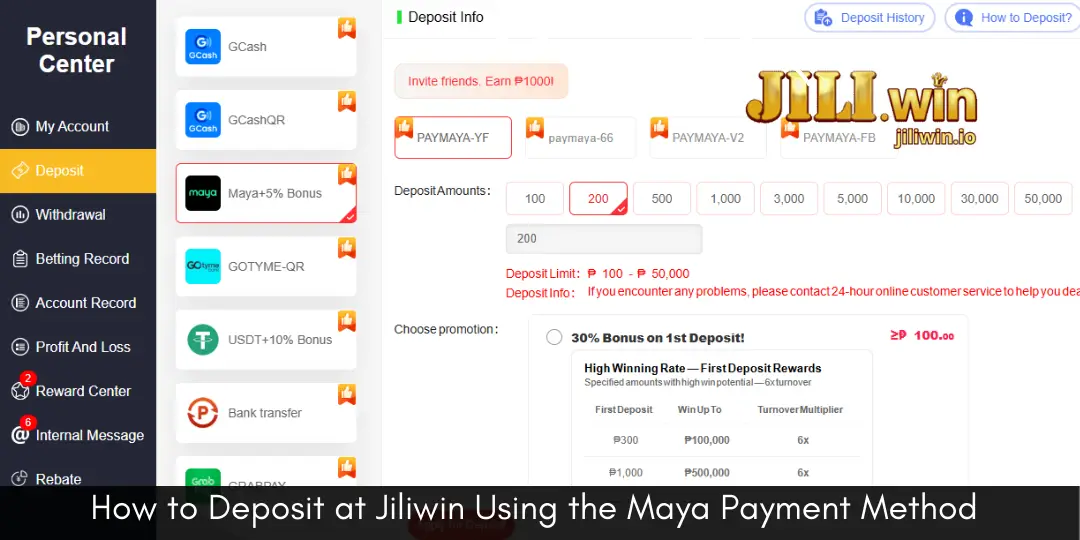
Maya is a popular payment method due to its fast processing speed and high level of security. Please follow the steps below:
Step 1: Log in to Your Account
Visit the official Jiliwin website and log in to your personal account.
Step 2: Select the Deposit Section
On the main interface, select the Deposit option to begin the transaction.
Step 3: Choose the Maya Payment Method
From the list of supported payment methods, select Maya.
Step 4: Enter the Deposit Amount
Enter the exact amount you wish to deposit, in accordance with Jiliwin’s specified limits.
Step 5: Confirm the Payment
The system will display the transaction details. Open the Maya application and confirm the payment as instructed.
Step 6: Complete the Transaction
Once the payment is successful, the deposited amount will be credited to your Jiliwin account within a short time.
Deposit Rewards and Benefits at Jiliwin (Receive 127P)
When depositing funds at Jiliwin, players are entitled to various benefits, including:
- Receiving a 127P reward according to the deposit promotion.
- Fast transactions with quick account crediting.
- High-level protection of personal information and transaction data.
- More opportunities to experience a wide range of games and exclusive features.
- Access to regular promotions and special offers.
Troubleshooting Deposit Issues at Jiliwin
If you encounter any issues during the deposit process, such as delayed transactions, funds not being credited, incorrect payment details, or system errors, you may take the following steps:
- First, check your payment information and transaction history in the Maya application.
- Allow some additional time for the system to process the transaction automatically.
- If the funds are still not credited after waiting, please contact Jiliwin Customer Support (CS) for prompt assistance.
Jiliwin’s Customer Support team operates continuously and is always ready to assist users, ensuring their rights and providing the best possible experience.
Conclusion
With a clear and user-friendly deposit process, secure Maya payment support, and attractive rewards of up to 127P, Jiliwin offers a convenient and reliable experience for players. In case of any issues, the dedicated Customer Support team is always available to provide timely assistance and ensure peace of mind for users.